Timeline
2026
Team
Solo concept · research, design, and build
Role
Product Designer · AI interaction, systems, prototype
I led research, product strategy, UX/UI design, testing, frontend implementation, and live rollout.
AI interaction
Permission-first
OS-level systems
Fluent 2
Trust & adoption
Concept + live prototype

The problem, part one
Every time your focus breaks, it takes about 23 minutes and 15 seconds to get it fully back. Gloria Mark measured that at CHI in 2008, across more than 700 hours of observation. The average knowledge worker now makes roughly 1,200 app switches a day and loses about 9 percent of annual working time, close to four hours a week, just reorienting. This isn't a new problem. It has been documented for two decades. What was missing was a fix at the level of the operating system itself.
to regain full focus after one interruption
Gloria Mark · CHI 2008
app switches per day, per worker
HBR · 2022
How I worked
This was six to eight informal discovery conversations, not a formal study, and I frame it that way. What I heard lined up closely with the academic findings, and one pattern came up again and again: people weren't rejecting AI's ability. They were rejecting how it showed up.
On Copilot showing up uninvited
Not a complaint about what it could do. A complaint about it arriving before any relationship existed.
On what would actually help
This person described Flow's folder-access model without knowing it existed. The appetite is real. The interaction pattern was the thing missing.
Observed patterns from informal conversations, matched against published research. Treated as direction, not proof.
The turn
How Copilot arrived
Forced into eight Windows surfaces at once, from Notepad to the Start menu. Each new placement landed on people who had already been let down, so ubiquity compounded distrust instead of recovering it.
Flow's rule
Flow surfaces one thing, only when it has earned the right to, and never acts without explicit permission. It is Copilot's missing first layer, powered by it, not competing with it.
Observed patterns from informal conversations, matched against published research. Treated as direction, not proof.
The data
paid conversion across commercial M365 Recon Analytics · Jan 2026
choose Copilot when real alternatives exist 92% walk away
NPS, roughly. At worst −24 in Sept 2025, recovered to about −20 by Jan 2026 Recon Analytics
Microsoft has read the same signals. In March 2026 Pavan Davuluri, EVP of Windows, publicly committed to removing unnecessary Copilot entry points, and the rollback began in April. In May, Microsoft named its first Chief Design Officer specifically to fix Copilot's fragmentation. The direction of travel is clear, and it points at interaction design, not model quality.
Systems view
Microsoft built four AI layers for Windows. All four wait to be asked.
Mu
Natural language mapped to a Settings panel. You type, it responds.
Reactive
Phi Silica
On-device generative features and content search. You ask, it answers.
Reactive
Copilot
Cloud conversational search, documents, answers. You prompt, it replies.
Reactive
Recall · Click to Do
Timeline search and local actions. You search, it retrieves.
Reactive
Flow
Reads calendar, app patterns, files, and time of day. Predicts the switch, prepares, and asks. You didn't type anything.
Proactive
Flow doesn't compete with these layers. It's the layer that makes them useful together, and it's the one that doesn't exist yet.
Interface decisions
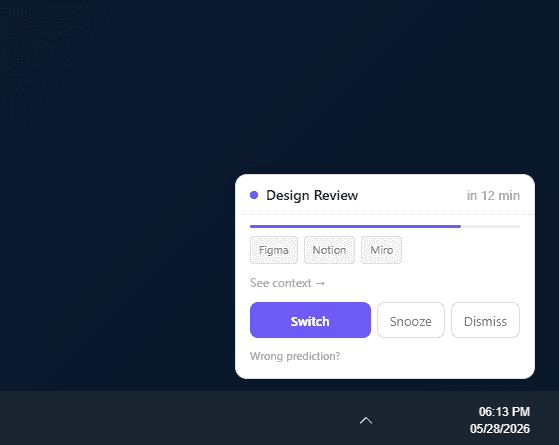
5 notification card states · sidebar in 6 states · onboarding · dashboard · all wired in the live prototype

Trust earned through accuracy over weeks · not through reach
Interface 01
Twelve minutes before a meeting, a single card appears in the bottom-right corner, out of your primary focus. "Here's what you'll probably need." Confirm and the workspace shifts. Dismiss and nothing happens, except Flow gets a little better. Snooze, dismiss, and edit are on every state. Control is never taken away.
Solves: the workspace you rebuild by hand before every meeting

Interface 02
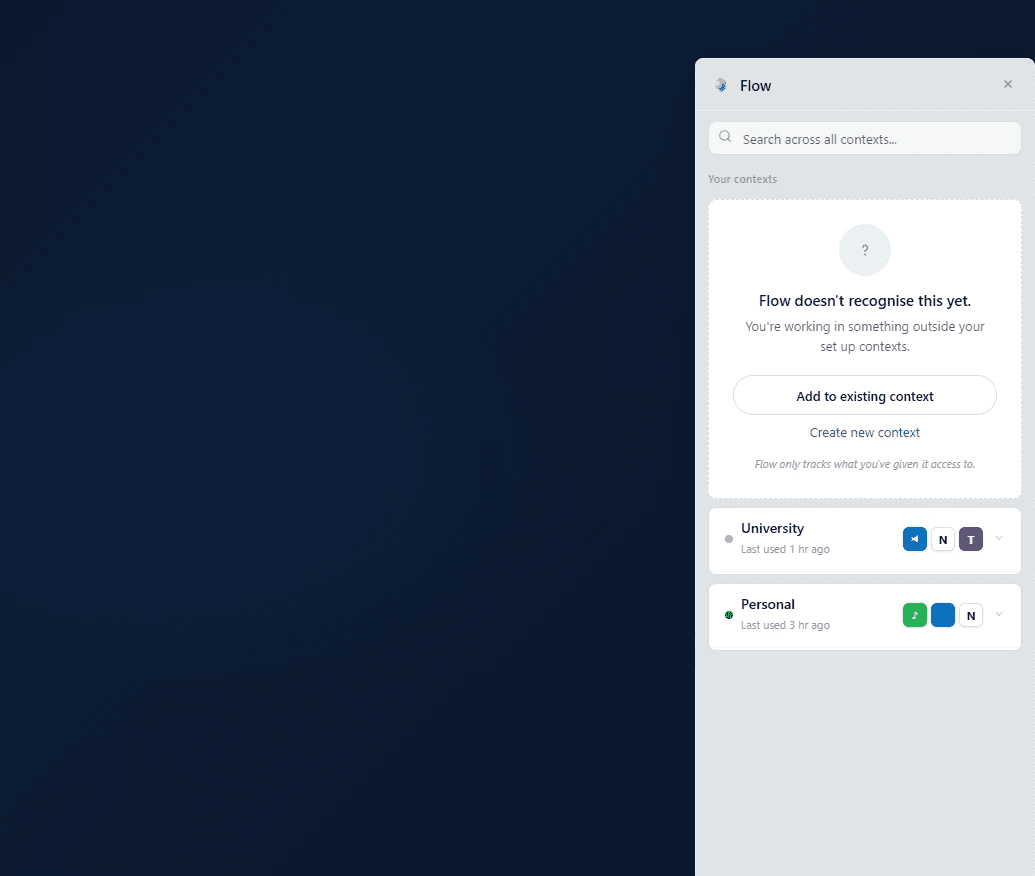
Six states, built as a Windows shell overlay rather than an app you open. It holds context-aware Quick Access and the "What Flow sees" panel, so the thing that reads your work is also the thing you can inspect and correct at any moment.
Solves: an assistant you can't see into

Interface 03
No setup wizard, no questions. Flow watches quietly for three days before it ever surfaces a card, so its first appearance is earned rather than forced. The first thing it does is nothing, on purpose.
Showing nothing is a design decision here, not an absence of one. Below its confidence threshold, Flow stays silent rather than bluff.
Solves: the assistant that introduces itself by interrupting you
Surfaces only on a real trigger


Solves: forced placement. It appears when a calendar event calls for it, never uninvited
Withholds below confidence

Solves: the trust breach. Never bluff on a high-stakes moment
Local-only inference

Solves: the trust breach. Never bluff on a high-stakes moment
One card, one confirmation

Solves: complexity. No settings required to start
The product's design system

The decision I'm proud of
One rule governs every feature in Flow: it sees, suggests, and steps back. The user decides, acts, and stays in control. Explicit permission before any action, always. The hardest and most important part of that rule is silence. When Flow's confidence is below its threshold, it shows no card at all. Most assistants treat a low-confidence moment as a reason to say something anyway. Flow treats it as a reason to say nothing, because a wrong suggestion on a high-stakes task is exactly how Copilot lost the room. Withholding is a trust-building act. The tradeoff is honest: this is a quieter product that proves itself slowly, earning habit through accuracy instead of forced reach.
What speech tools measure
Everywhere at once
Acts first
Asks forgiveness
Speaks when unsure
What this system stores
Once, when it's sure, with your permission

Forced placement
Eight surfaces at once
Before any relationship
Distrust compounds
Users disable it
Ubiquity made it worse, not better.
Earned placement · what I chose
One card, on a real trigger, after three silent days
It appears only when it has earned the right to, and it can always be dismissed. Reach is replaced with accuracy.
Why now
Flow targets the 600 million Windows PCs already on people's desks. The pieces it needs are shipping: Phi Silica, Copilot Plus NPUs, the Windows Copilot Runtime. Microsoft's own Project Solara, announced at Build 2026, points at new device categories on Android, which leaves the installed base of existing PCs open. Flow is a design pattern for hardware people already own, not a bet on hardware they'll buy.
Windows PCs where the pieces exist and the pattern is missing
Where it stands
Flow is a concept with a live, wired prototype, so there are no adoption numbers, and I won't invent any. Two things stand in for them. First, the design independently satisfies all five of Microsoft's Responsible AI principles, not as a compliance checklist bolted on afterward, but as a direct result of the permission-first rule. Second, Flow occupies the one layer of the Windows AI stack that every existing system leaves empty: the proactive one.
Fairness
Behavioral signals only. No demographic inference. It applies the same way to every user.
Reliability & safety
Confidence thresholding and explicit confirmation before any workspace change. Below threshold, nothing.
Privacy & security
Fully local inference on-device. Folder access is opt-in per folder. Nothing is uploaded.
Inclusiveness
Three-day silent learning means no setup wizard and no questions. It works from first use.
Transparency & accountability
A "What Flow sees" panel and a full history you can inspect, correct, override, or delete.
What's still open
01
The folder AI chat conflicts with the permission model
A conversational layer inside a folder's context is genuinely useful, but it cuts against the sees-suggests-steps-back rule, because a chat invites action. I haven't resolved that tension yet, and I'd rather name it than pretend the model is airtight. It needs a design session before it gets built.
02
Microsoft 365 integration screens
Outlook, PowerPoint, Word, and Teams surfaces are designed in principle but not built. The PowerPoint sidebar moment, where a template suggestion appeared and got used without being asked, is the real-world proof that this model already works inside one app.
03
Context management and cleanup
The edit-and-create-context screens, plus an icon and logo pass, are the next build phases. The core loop is proven in the prototype; the edges are still being wired.


